PDA

View Full Version : Anyone is running Linux?


adrian
July 29th, 2004, 10:35 AM
I have a Intro to Unix class and in it, we are installing and running Linux 7.2 and 9.0 on Vmware Virtual Machines.

I know that there aren't as many geeks/techies as there are in other message boards I frequent everyday, but I want to know if there are any local people that run Linux (or has a friend that runs Linux).

I'm interested in installing Linux 7.2 on my home computer (first as a Virtual Machine via Vmware, then probably get some space to dual boot WinXP and Linux).

Any tips/suggestions as to help my transition better? (in terms of customization, ease of use, etc).

Help is appreciated and Mahalo in advance.

pzarquon
July 29th, 2004, 10:54 AM
Linux 7.2? What flavor?

I've messed with Linux quite a bit, but haven't yet fallen in love enough to make it the main OS on a workstation.

I've run various updates to RedHat (http://www.redhat.com/) (now Fedora (http://fedora.redhat.com/) on the noncommercial side). My daughter's PC was running Mandrake (http://www.linux-mandrake.com/) for a while (a pretty slick distribution that really shows how free Linux just might make a reasonable alternative to Windows)... but I could never get Flash to work, so it went back to Windows 98. I've also tried to keep up with bootable CD distributions, particularly Knoppix (http://www.knopper.net/knoppix/), because, frankly, it's amazing that you can run a PC from a CD (when Windows would require twenty CDs for essentially the same functionality). When your computer dies, you can whip out one of these CDs and still get into the nuts and bolts.

Need help? There's LUAU (http://lists.hosef.org/cgi-bin/mailman/listinfo/luau), a local Linux mailing list I'm on that's interesting (although 90 percent of the topics go way over my head).

Going dual boot is one option, but messing with hard drive partitions and making two OS play nice can become a catastrophic mess if you're not careful. One thing I loved about Linux (and why it was put on my kid's PC), though, is that it requires considerably less horsepower. You could probably run Linux comfortably on a five-year-old Pentium II machine... the type of machine that would otherwise be an oversized doorstop!

adrian
July 29th, 2004, 05:43 PM
Linux 7.2? What flavor?

I've messed with Linux quite a bit, but haven't yet fallen in love enough to make it the main OS on a workstation.

I've run various updates to RedHat (http://www.redhat.com/) (now Fedora (http://fedora.redhat.com/) on the noncommercial side). My daughter's PC was running Mandrake (http://www.linux-mandrake.com/) for a while (a pretty slick distribution that really shows how free Linux just might make a reasonable alternative to Windows)... but I could never get Flash to work, so it went back to Windows 98. I've also tried to keep up with bootable CD distributions, particularly Knoppix (http://www.knopper.net/knoppix/), because, frankly, it's amazing that you can run a PC from a CD (when Windows would require twenty CDs for essentially the same functionality). When your computer dies, you can whip out one of these CDs and still get into the nuts and bolts.

Need help? There's LUAU (http://lists.hosef.org/cgi-bin/mailman/listinfo/luau), a local Linux mailing list I'm on that's interesting (although 90 percent of the topics go way over my head).

Going dual boot is one option, but messing with hard drive partitions and making two OS play nice can become a catastrophic mess if you're not careful. One thing I loved about Linux (and why it was put on my kid's PC), though, is that it requires considerably less horsepower. You could probably run Linux comfortably on a five-year-old Pentium II machine... the type of machine that would otherwise be an oversized doorstop!
Thanks for the info.

I think its Redhat. And if I knew that there was an OS that could run on a PII, then I'd save my brother's machine. I completely gutted it and donated the parts to my school for a class.

But I'll first run it in a Virtual Machine that I'll install using Vmware so that I can see what my computer needs to work on before I commit more hard drive space to it.

mel
July 29th, 2004, 10:26 PM
My Mac OSX computer runs on top of a Unix kernel, if that counts. I know it is not Linux, but Unix and Linux seem to have a lot of things in common (geeky CLI but fun to goof around with at times). Just think of Mac OSX as the pretty KDE or Gnome GUI that runs on top of your shell. Of course IMHO OSX is like way superior to KDE or Gnome.

helen
July 29th, 2004, 10:35 PM
If I had the space to run multiple computers at home, then yeah one of them would be running some version of Linux. I did try Redhat on a PC for a few days a few years ago but it was only to test out if something was wrong with the computer.

easTTriver
July 30th, 2004, 10:55 AM
4-5 years ago, i had setup a multi-boot on my pc. back then i had win98, win2000, and linux redhat.

partition magic works great for messing with around with partitions. the problem i had was that because of the way my primary partitions were, i couldn't install linux on a partition where it could boot using the NT OS loader. i had to install a 3rd party software for booting or a linux boot disk.

linux is great for servers, but until they have the wide assortment of applications taht windows has, i probably won't be using it for a desktop OS.

adrian
July 31st, 2004, 11:46 AM
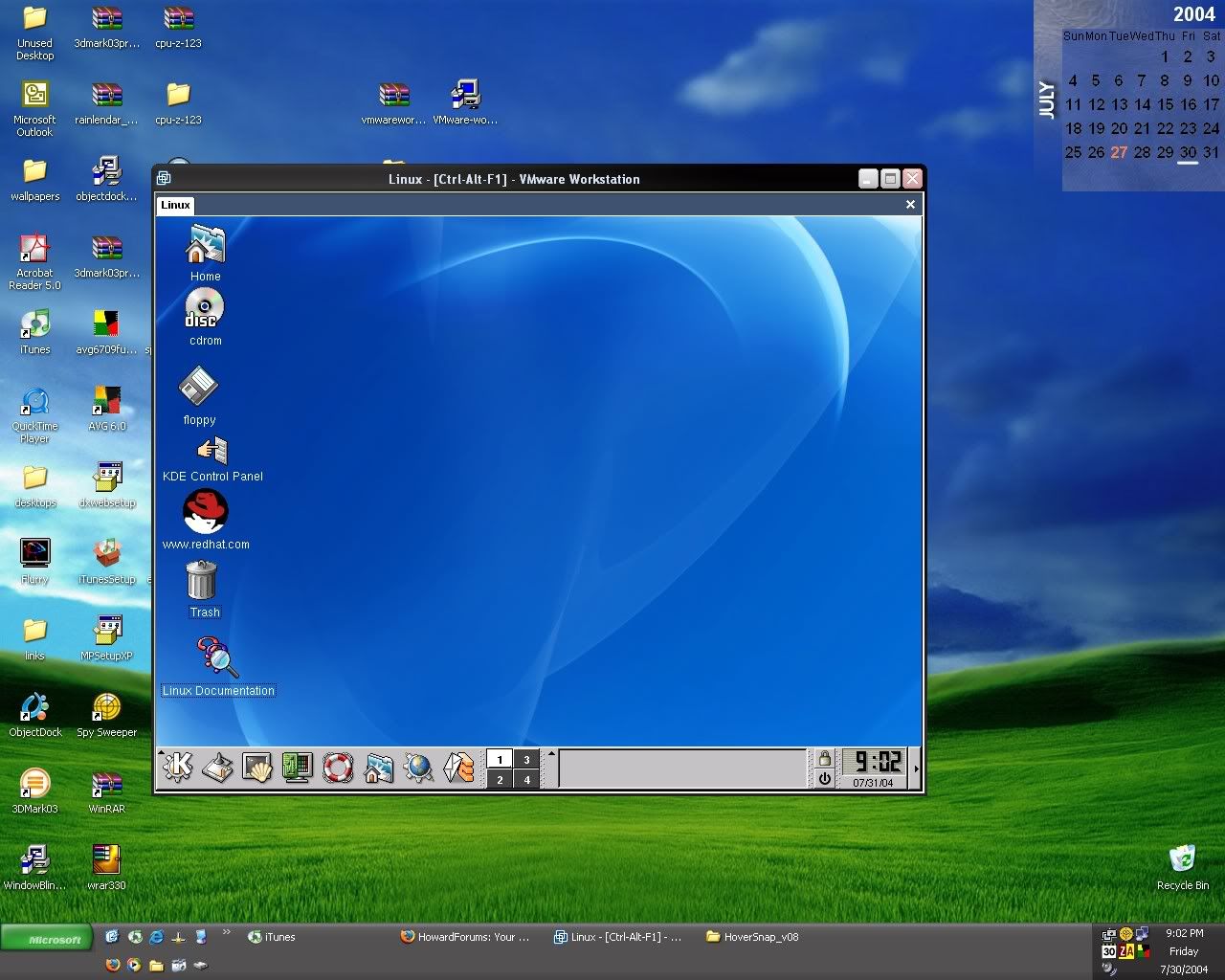
To show proof, here's my version of Linux running in XP:
http://img.photobucket.com/albums/v81/adri1456/th_XPandlinux.jpg (http://img.photobucket.com/albums/v81/adri1456/XPandlinux.jpg)

Sorry if this streached the thread.

helen
February 1st, 2006, 10:07 AM
Been running Ubuntu V5.04 at work for the last couple of months. It's not my main system but so far I am comfortable with it. I do have one question. I have heard about the Gnome and KDE GUI for Linux, I know that there are differences between the two but I haven't used it long enough to know what those differences are. Anyone got a clue about the differences between the two?

From what I gathered so far by Ubuntu uses Gnome as the default GUI.

Cameron
February 1st, 2006, 11:19 AM
i'm running suse , but i've tried everythong from fedora to ubuntu

rbinck
February 2nd, 2006, 08:02 AM
Only in my TiVo.

Cameron
February 2nd, 2006, 03:16 PM
oh yeah i got linux on my ipod too !!

beaker
February 2nd, 2006, 03:57 PM
linux is great for servers, but until they have the wide assortment of applications taht windows has, i probably won't be using it for a desktop OS.

Windows is great for secretaries, but until they have the wide assortment of standard numerical analysis libraries, code development tools, and various handy unix-type tools that linux has, I probably won't be using it for a desktop OS. :)

Cameron
February 2nd, 2006, 04:06 PM
my only problem with a full linux conversion is the lack of third party support, especially from apllications I love, For instance photoshop I need photoshop to survive , i can't live with out it, but lt's near impossible to get anything but the outdated ps7 to work and even then theres issues, also macromedia i think you can only use dreamweaver 2004 on linux, i need both and can't afford to lose them hence i'm stuck with xp

mel
August 10th, 2006, 05:36 PM
It must be a slow day in Honokaa. I got around to downloading and creating a bootable Ubuntu Linux (http://www.ubuntu.com/) Live CD for my Mac this afternoon. Fact is I am using Firefox running off the CD with Ubuntu, posting this form my iBook G3. What fun... the interface is not as elegant as OSX, but I guess in a pinch this works if you want something for no $$$.

Perhaps when I get back to HNL and if there is a way to install this onto an external Firewire drive, I may install it on my G4.

Now if I can figure out how to do a screenshot with this...

==============

Addendum: They have a screenshot program included as a built in accessory with the Ubuntu distro -- so here is a screenshot:

http://cdn-17.cdn.buzznet.com/assets/users12/macpro/default/Ubuntu_Desktop_on_my_iBook_G3--large-msg-11552675146.jpg

It seems the live CD has a built-in installer to allow for installation of this into a regular hard drive. If making this CD was simple, I can hope that the install of the software to another hard drive on my G4 perhaps will be just as simple.

The Mac G4 backups is a 1 GB USB thumb drive connected to my iBook's USB port. Ubuntu read this without having to configure or do anything else. The internet access was seamless too... no configuration needed for the broadband we have here.

Once I got this thing up and running, the live CD included several software programs to run like "The Gimp", the screeshot accessories, Firefox web browser and the Evolution mail and chat program. I tried those. There were several other programs that I did not bother with this initial test including a bunch of games, a terminal program, CD burning and playing programs and more.

Bard
August 11th, 2006, 06:42 AM
Long time Linux user here, can't live with it, can't live without it... :D Started out with SLS and Linux 0.99.1 (that ought to date me) and running Ubuntu on a server now. Good stuff! It's gotten almost as easy to use as Windows (which is not to say "easy", just not "insanely arcane" :))

Eric
August 11th, 2006, 09:30 AM
I've also tried to keep up with bootable CD distributions, particularly Knoppix (http://www.knopper.net/knoppix/), because, frankly, it's amazing that you can run a PC from a CD (when Windows would require twenty CDs for essentially the same functionality). When your computer dies, you can whip out one of these CDs and still get into the nuts and bolts.I've been running my PC off of a Knoppix boot CD for weeks now, because my WinXP install has been giving me too many headaches. When I get around to it, I'm reformatting and reinstalling WinXP from scratch, but until then Knoppix gets the job done. Only problem is, I don't have NTFS read-write access. I understand there are Linux tools that do this, but I haven't found what I'm looking for: a Linux boot CD with a GUI and no-hassles NTFS read-write access. By "no hassles", I mean that I need something that will automatically mount all drives without my input. Is that asking too much? :rolleyes:

Bard
August 11th, 2006, 10:26 AM
NTFS in Linux is in a pretty sad state. Read support has been around forever, but the very best "write support" you can get right now as a file system for regular usage is allowing you to change bytes in existing files (not make new ones or extend files and so on). I think it's mostly used for these Linux installs that run inside a container file on your Windows partition. I was trying to use Knoppix to recover a crashed W2K at work and was pretty dismayed about that. I heard there's something underway to fix this now but I haven't seen it yet.

There's a set of user-space utilities to access NTFS, and that might support writing, but it's probably pretty inconvenient.

Cameron
August 11th, 2006, 11:02 AM
NTFS in Linux is in a pretty sad state. Read support has been around forever, but the very best "write support" you can get right now as a file system for regular usage is allowing you to change bytes in existing files (not make new ones or extend files and so on). I think it's mostly used for these Linux installs that run inside a container file on your Windows partition. I was trying to use Knoppix to recover a crashed W2K at work and was pretty dismayed about that. I heard there's something underway to fix this now but I haven't seen it yet.

There's a set of user-space utilities to access NTFS, and that might support writing, but it's probably pretty inconvenient.

Actually you can get full read write support using fuse and ntfs-3g. Its super easy to setup and and works perfectly. heres the link http://lunapark6.com/?p=1710 . Even though ntfs 3-g is still in beta i've been using it for about a month with no problems.

on a side not I ditched suse because it was too inflated and I didn't need half of the config tools, since command line worked while the tools hardly worked so i'm back on ubuntu again which has improved alot since I last used it, so much so that I use it exclusively on my laptop